
Granola vs Fathom: Which Is More Practical in 2026?
By Oliver Campbell , Edited & Published By Toolvs Team
Granola vs Fathom, which is the better AI meeting tool?
Here is the bottom-line verdict: If your work mostly revolves around internal 1-on-1s and product discovery interviews, if you hate third-party bots hovering in your calls, and if you like jotting down a few quick cues for AI to refine, buy Granola. If you run a sales, recruiting, or customer success pipeline, rely heavily on auto-syncing notes into HubSpot or Salesforce, and need full video replays with highlight clips, pick Fathom.
My daily work involves constant virtual meetings, and my team and I have cycled through almost every transcription tool available. Today, I want to share our candid takeaways from months of living inside Granola and Fathom, including the workflow friction, the actual limits, and how to decide between them. In our experience, they pursue two opposite design philosophies: Granola treats meetings as an extension of personal thought, while Fathom turns them into an automated assembly line.
2026 Granola vs Fathom key parameters
Before examining the workflow nuances, here is how both tools compare across key parameters and verified 2026 pricing:
| Comparison Metric | Granola AI | Fathom |
| Capture Mechanism | Local desktop app (captures system and mic audio via virtual soundcard, 100% bot-free) | Virtual bot joins the call (Mac bot-free desktop app currently in beta) |
| Supported Platforms | Mac and Windows desktop clients | Zoom, Google Meet, Microsoft Teams |
| Media Retention | Zero audio or video stored; audio is purged immediately after transcription | Full video and audio recordings saved with timestamped highlights |
| Core Advantage | Blends personal jotting with AI transcripts; structured and thoughtful output | Native two-way CRM sync, structured action items, playlist sharing |
| Integrations | Notion, Slack, HubSpot, Zapier, Model Context Protocol (MCP) | HubSpot, Salesforce, Close, Slack, Zapier |
| Free Plan Limits | Capped at 25 lifetime meetings; restricted history access | Unlimited recording and transcripts; advanced AI summaries capped at 5 calls/month |
| 2026 Pricing Tiers | Solo: $18/mo; Business: $14/user/mo; Enterprise: $35/user/mo | Premium: $16–$20/mo; Team: $15–$19/user/mo; Business: $25–$28/user/mo |
| Real Drawbacks | Trains models on user data by default; speaker attribution slips in multi-speaker audio | Visible bots can put clients on edge; changing primary account emails is difficult |
| Best For | Founders, product managers, consultants, privacy-minded professionals | Sales reps (SDRs/AEs), customer success teams, executive recruiters |
Granola vs Fathom: Hands-On Daily Experience
Audio Capture
What originally drew me to Granola was simple: I was tired of explaining to clients why a bot named “Notetaker” was sitting in our private room.
Granola runs quietly on your machine, capturing speaker output and microphone input directly. There is no bot on the attendee list, and nothing pops up on the other person’s screen. When I lead executive check-ins, sensitive interviews, or 1-on-1 coaching, this invisible capture keeps the room relaxed and candid.
Fathom still operates primarily by sending a virtual participant into the meeting. It automatically announces that the call is being recorded, which saves you the trouble of giving a legal disclaimer.
However, during informal conversations, that extra presence can make people guarded. Fathom has rolled out a bot-free capture option for Mac users, but the bot remains the default for most teams, and its presence is hard to ignore.
Note Quality
The contrast in output between these two tools comes down to how their prompts handle context.
During a Granola meeting, I keep its minimal pad open and tap out a few rough bullet points, like “target launch pushed to Q3” or “cut budget by half.” Once the meeting ends, Granola treats those manual cues as anchors, pulling the relevant dialogue from the full transcript to build clear, cohesive arguments. The result reads like a polished memo I spent thirty minutes writing myself.
Fathom acts more like an automated court reporter. Within two minutes of hanging up, it drops a clean summary into your inbox covering background, key discussions, and clear action items.
The structure is reliable enough to forward to colleagues right away. The downside is its lack of editorial perspective; passing pleasantries and minor tangents often get the same structural weight as your primary business decisions.
CRM Automation and Follow-Ups
If you oversee a sales or customer success team, Fathom saves hours of manual administrative work every single week.
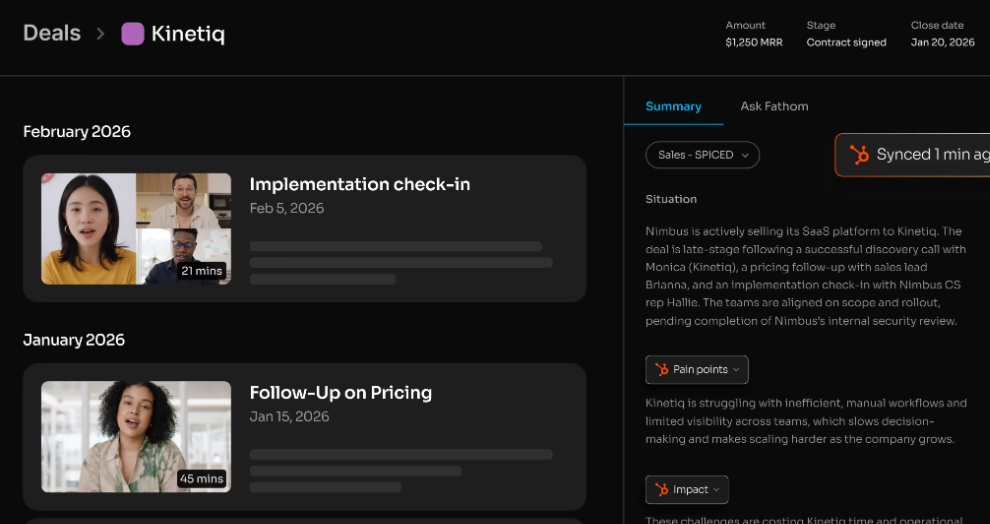
Right after I finish a product demo, Fathom pushes buyer objections, pricing numbers, and action items directly into the matching deal card in HubSpot. I never have to open our CRM just to paste notes manually.
Our sales leads also create shared playlists in Fathom. They clip thirty-second video moments where prospects push back on contracts and bundle them for onboarding new hires.
Granola handles post-call workflows differently. While it connects to HubSpot, it functions much more like a personal knowledge base. Through its Model Context Protocol (MCP) support, I can feed my meeting notes straight into local AI models, allowing me to query dozens of client interviews at once to identify recurring product requests.
Fathom vs Granola Real Limitations
After months of daily use and digging through real user feedback, both platforms show clear friction points.
Granola Real Shortcomings
Privacy settings are the biggest hidden concern. Granola has achieved SOC 2 Type 2 compliance, but on both the free and business tiers, the option to let Granola use your meeting data to train its models is turned on by default. Unless you manually dive into the settings to turn it off or upgrade to the enterprise plan, your meeting text can be fed into model improvements.
There is also the compliance burden of silent capture. Having no bot join the room is clean, but it leaves the duty of disclosing the recording entirely on your shoulders. If you are operating in jurisdictions with two-party consent laws and forget to give a verbal heads-up, you could face compliance issues.
Finally, Granola relies on mixed system audio rather than discrete, per-person audio tracks. Whenever three or more people speak at once, or if someone has microphone echo, its speaker labels often become inaccurate. Colleagues have also run into occasional app crashes mid-meeting or calendar sync errors where the app loaded an old note window, meaning critical numbers still require a manual spot-check.
Fathom Pain Points
Fathom’s most frustrating operational flaw is account migration. If you switch company email addresses or try transferring historical client records into a corporate workspace, you can easily end up locked out. Users have noted losing access to years of saved customer transcripts because customer support took too long to resolve email adjustments.
Another clear limitation is the lack of standalone file uploads. Just like Granola, Fathom provides no way to import offline audio or video files. If you record an in-person meeting on your phone or voice recorder, neither platform can process it, forcing you to use a secondary tool.
Lastly, bot management can fail unexpectedly. As platforms like Zoom tighten their security controls around third-party meeting bots, Fathom can get trapped in the waiting room unnoticed. If you do not monitor your participant list at the start of a call, you might finish a forty-minute meeting only to realize nothing was recorded.
Fathom vs Granola Final Decision

Pick Granola if you mostly handle your own meetings, run discovery sessions, and like typing rough outlines while you listen. It keeps third-party bots out of your calls and produces structured notes that mirror your personal thought process.
Pick Fathom if your performance is tied to sales targets and pipeline management. If you need customer updates pushed straight into your CRM and rely on recorded video snippets for team coaching, it eliminates repetitive meeting administration.
If you belong to an enterprise with strict IT policies that prohibit data leaving local networks, or if you need voice-print search across thousands of archived audio hours, skip both. Enterprise-grade tools like Otter or dedicated platforms like Gong will fit those organizational requirements much better.