
Superwall vs RevenueCat: My Testing Impressions 2026
The short answer: If you prioritize absolute data reliability, a mature developer ecosystem, and rarely tweak your paywall, go with RevenueCat. But if you want to run rapid A/B tests to maximize conversions and hate paying a “tax” on your total revenue, switch to Superwall.
Hi everyone! As an indie developer trying to monetize my apps, dealing with the constant headache of cross-platform purchases and paywalls is just part of the job. Having used both RevenueCat and Superwall in production, I want to share my honest, hands-on experience to help you choose the right tool.
RevenueCat vs Superwall: 2026 Core Parameter and Pricing Comparison
Here is a direct look at how both products stack up against each other under their latest 2026 guidelines:
| Metric | RevenueCat (2026) | Superwall (2026) |
|---|---|---|
| Primary Focus | Reliable receipt validation & cross-platform entitlement sync | No-code paywalls, dynamic A/B testing & conversion optimization |
| Pricing Model | MTR (Monthly Tracked Revenue): Commission on all app subscription revenue | MAR (Monthly Attributed Revenue): Commission only on revenue driven by their paywalls |
| 2026 Price Tiers | 1% fee on MTR above $2.5K, with a $100/month minimum platform fee | 1% fee on MAR above $10K, free if you do not use their paywalls |
| Free Tier | Free up to $2,500 MTR per month | Free up to $10,000 MAR per month; Purchase SDK is always free |
| Hidden Drawback | Billed on Gross revenue (before Apple/Google commission and VAT) | MAR attribution logic has a slight learning curve |
| A/B Testing Depth | Basic offering comparisons (requires code changes for layout tests) | Visual drag-and-drop builder, supports multi-variable audience segments |
| Best For | Stable apps that rarely change their paywall layouts | Growth-stage apps aggressively testing to optimize conversion |
Superwall vs RevenueCat: Deep Dive into Workflow and Subscription Pricing
1. In-App Purchase Workflow and Paywall Deployment Efficiency
Superwall wins on workflow flexibility and deployment speed, thanks to its robust remote config engine.
When we built our paywalls with RevenueCat, we constantly ran into layout issues even when using their native templates. On smaller screens like the iPhone SE, texts would overlap or push the call-to-action button completely off-screen, forcing us to revert to hand-coded native layouts.
Every time we wanted to change a background image or test a promotional copy, we had to submit a new build and wait for App Store review. For an agile team trying to react to market trends, this was a massive waste of engineering time.
Superwall solves this by utilizing a web-standard runtime that renders instantly and feels indistinguishable from native code. We can change a layout, swap an image, or update pricing in the web dashboard, and the user sees the changes without even needing to relaunch the app. It cut our design-to-deployment loop by more than 90%.
2. Subscription Pricing Models and Hidden Profit Leakage
Superwall’s MAR model is a massive relief for your margins compared to RevenueCat’s rigid 1% revenue tax.
Most developers fail to calculate the true impact of RevenueCat’s 1% fee because it is billed on gross revenue (before Apple/Google take their 15% to 30% cut and before local VAT).
We once ran an app that did $45,000 in gross monthly revenue. After Apple’s 30% cut and local taxes, our net payout was around $30,000. Yet RevenueCat billed us 1% of the full $45,000—which is $450, representing an effective rate of 1.5% on our actual net earnings.
As your app grows, paying a permanent 1.5% net income tax on users who would have renewed anyway feels incredibly painful.
Superwall changed the game by making receipt validation, webhooks, and entitlement management entirely free through their Purchase SDK. They only charge a 1% fee on conversions that happen directly through a Superwall paywall (MAR), after a generous $10,000 free monthly threshold. This means automatic renewals, web billing, and organic sales do not cost you a single cent.
3. Paywall A/B Testing and Real Conversion Optimization
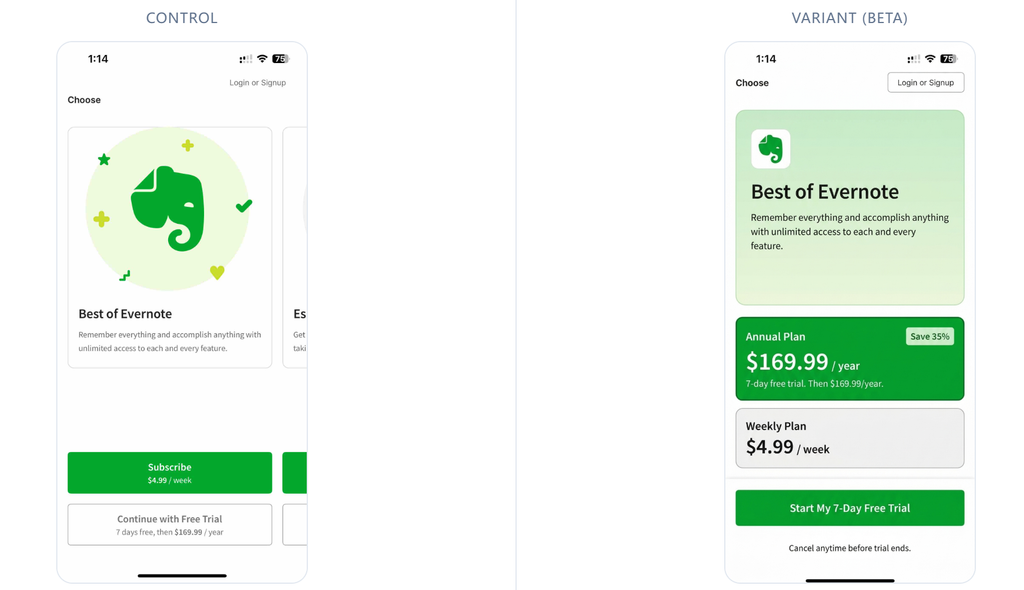
Superwall is far superior for running structured experiments that directly move the needle on conversions.
We ran an experiment swapping a standard vertical layout for a horizontal, side-by-side comparison of our monthly and annual plans. The visual change made the annual plan look far more appealing, pushing our conversion rate up by 11.5%.
In another test, we added a small line of text above the primary buy button: “No payment due now”. This simple reassurance eased user friction, boosting our free trial starts by 14.2%.
With RevenueCat, running these visual tests is extremely difficult because their experiments are limited to swapping back-end products. If you want to test two different visual layouts, you still have to hardcode both designs on the client side and manage the logic yourself.
RevenueCat vs Superwall: Real Developer Limitations
No software is perfect. To make an objective decision, you should consider the core development and operational limitations of both tools:
| Limitation Metric | RevenueCat | Superwall |
|---|---|---|
| Framework Compatibility | React Native/Flutter wrappers require frequent updates and can occasionally crash. | React Native/Expo SDK has heavy caching, causing preview delays. |
| Layout Responsiveness | Static templates scale poorly on different aspect ratios, leading to clipped elements. | The visual builder has a steep learning curve and requires understanding CSS units. |
| Debugging Experience | Sandbox testing is tedious, with occasional delays in updating entitlement state. | Live updates can fail to load in low-connectivity areas without a proper local fallback. |
1. RevenueCat Real Limitations: Gross Revenue Tax and Sandbox Testing Issues
If you browse communities like Reddit, you will find plenty of threads complaining about RevenueCat. The primary complaint is always the gross revenue billing, which makes the RevenueCat dashboard practically useless for real bookkeeping because it ignores app store commissions and VAT.
The initial setup is also notoriously tedious. You spend hours configuring API keys, offerings, entitlements, and manual product mappings in their portal before you can even fetch a product.
Worse, sandbox testing can be a headache. We have experienced issues where test purchases went through on Apple’s end, but the SDK failed to update the entitlement state, leading to false negatives and endless debugging loops.
2. Superwall Real Limitations: React Native Caching and Steeper Learning Curve
Superwall has its own weaknesses, particularly for teams using cross-platform frameworks like React Native or Expo. Because the React Native library acts as a wrapper around native iOS and Android SDKs, hot reloading is practically non-existent.
We often changed a layout in the Superwall editor, but the preview simulator on our local machine failed to update. We had to repeatedly delete the app, rebuild, and clear caches to see changes, which slows down fast-paced development.
Furthermore, its visual editor is highly complex. If you do not understand front-end layout concepts like vw, vh, and CSS flexbox, your paywall might look perfect on an iPhone 15 Pro but render as an unreadable, overlapping mess on a smaller device.
FAQ: Superwall vs RevenueCat Developer Questions
Can Superwall completely replace RevenueCat in 2026?
Yes, absolutely. Since releasing its own Purchase SDK, Superwall operates as a fully self-contained subscription infrastructure. If you are starting a new project, you can use Superwall to handle all receipt validation and entitlement management without importing RevenueCat at all.
Which SDK pricing is cheaper for scaling mobile apps?
Superwall is significantly cheaper at scale. RevenueCat takes a flat 1% of almost your entire gross revenue forever. Superwall only charges for conversions going through their paywalls, leaving your organic renewals, web payments, and grandfathered users entirely untouched.
Is native StoreKit 2 a better RevenueCat alternative for solo developers?
If your app is iOS-only and has simple monetization, native StoreKit 2 is often the best choice. Setting up third-party SDKs requires its own share of configuration. If you do not need cross-platform capabilities, sticking to StoreKit 2 lets you keep 100% of your earnings.
RevenueCat vs Superwall: 2026 Selection Recommendations

Choose RevenueCat for App Store Stability
Your app has stabilized, you are content with native, rarely-changing layouts, and your only priority is absolute transaction engine stability over monetization experimentation.
Choose Superwall for Continuous Paywall A/B Testing
Your app is in a high-growth phase and you need to aggressively run visual A/B tests on prices, copy, and layouts without constantly submitting app updates or paying a gross revenue tax.
Skip Both for Custom In-House Subscription Backends
Your product relies on highly complex offline transactions, custom dynamic bundles, or if your team has strict security requirements that demand building a proprietary backend receipt validation server.