
Airtable vs Monday: Our Team’s Review in 2026
The bottom line: If you need to manage complex relational data and build custom business systems where most team members only view reports, get Airtable. If your primary need is tracking team deliverables, out-of-the-box Gantt charts, and fast task execution without a steep learning curve, buy monday.com.
In our day-to-day operations, we built an automated content distribution engine spanning 12 interconnected tables in Airtable. On monday.com, we coordinated quarterly roadmap delivery across seven cross-functional squads.
Today, I am breaking down our hands-on team experience so you can see how both tools actually perform in the real world.
Quick Comparison
To start, I put together this updated comparison table covering the core parameters of monday vs airtable:
| Comparison Metric | Airtable | monday.com (Work Management) |
|---|---|---|
| Core Architecture | No-code relational database & custom app platform | Visual team project management system |
| Starting Price | Team: $20/user/mo (annual); Business: $45/user/mo | Basic: $9/user/mo; Standard: $12/user/mo; Pro: $19/user/mo |
| Minimum Seat Requirement | 1 seat minimum; pay only for actual seats used | 3-seat minimum; seats sold in tiers (3, 5, 10, 15) |
| Free Tier Limits | 5 collaborators, 1,000 records/base, 100 automations/mo | Up to 2 seats, 3 boards, 200 tasks, no native automations |
| External Collaboration | Free read-only & forms; client editing requires Portals or Softr | Standard: 4 guests equal 1 paid seat; Pro unlocks private boards |
| Hard Plan Limits | 50,000 records/base cap forces an upgrade to Business ($45/user) | Formula column, time tracking, and advanced charts locked to Pro |
| Automation Caps | Automations stop immediately when limits are hit; no pay-as-you-go | Monthly action caps; exceeding limits requires an account upgrade |
| Best Suited For | Operations leads, data managers, content pipeline builders | Cross-functional project managers, creative teams, SMBs |
Monday vs Airtable: The Real Feature and Workflow Breakdown
The debate around monday com vs airtable usually centers on delivery efficiency.
The answer depends on whether your team handles interconnected datasets or manages linear execution timelines.
Data Architecture vs. Linear Execution
Airtable’s core strength is its native relational database engine. It handles many-to-many linked records, cross-table lookups, and rollup summary calculations effortlessly.
When we set up our marketing pipeline, we linked 12 individual tables inside a single Airtable base.
Once a writer changed an article’s status to “Published,” the creator payout tracker, distribution schedules, and quarterly target metrics updated automatically. Traditional project management software simply cannot pull off multi-tiered calculations like this.
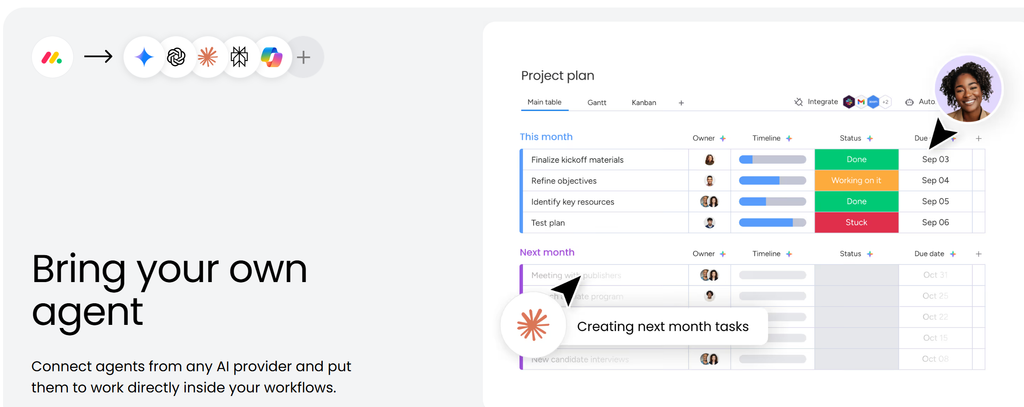
monday.com takes a linear, execution-first approach. The workspace centers on boards, item groups, and status columns designed around assigning owners and setting deadlines.
The visual feedback is immediate and satisfying. The battery progress widget at the top of a board shows project bottlenecks at a glance.
However, cross-board data linking in monday.com is clunky. It excels at answering what each person needs to ship this week, whereas Airtable traces every relational thread behind a business asset.
Onboarding Speed and System Maintenance
The time required to roll out each platform to a team could not be more different.
When onboarding a new six-person team onto monday.com, selecting a template and getting everyone operational took roughly half a day.
Anyone who has used a spreadsheet or social app can assign tasks and update statuses within 30 minutes. Our team’s internal adoption rate on monday.com consistently cleared 75% without formal training sessions.
Airtable sits on the opposite end of the spectrum. The entire system relies on having an internal power builder who understands database architecture.
Designing a functional Airtable base requires two to three weeks of mapping tables and linking fields. For team members without database experience, the learning curve is punishing.
If the person who built your base leaves the company, complex scripts and linked formulas often become an unmaintained mess. When a formula breaks and nobody knows how to debug it, team members quietly drift back to their own personal spreadsheets.
The Math Behind Your Monthly Invoices
Both platforms have distinct pricing constraints that can catch you off guard.
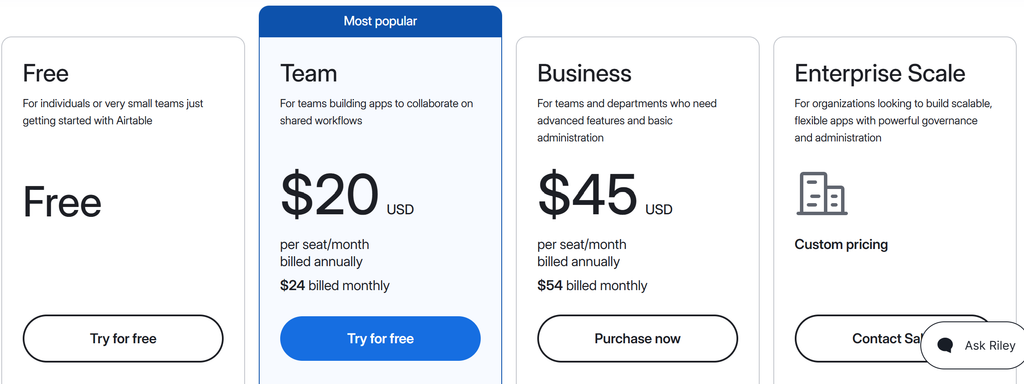
With Airtable, the easiest trap to overlook is the hard record ceiling. The Team plan costs $20 per seat per month and caps bases at 50,000 records.
Once a production base reaches 50,001 records, you cannot purchase extra storage capacity. You are forced to upgrade every seat in the workspace to the $45 Business tier.
For an eight-person team, monthly software spend jumps from $160 straight to $360. In addition, anyone given editing permissions to a single table gets billed as a full-price seat for the entire month.
monday.com’s pricing friction comes from mandatory seat bundling. You cannot buy licenses for your exact headcount because seats sell in buckets of 3, 5, 10, and 15.
A team of six people must purchase a 10-seat plan, paying for four empty licenses every month.
The tier restrictions are equally frustrating. The Basic plan lacks a timeline or Gantt view, while essential day-to-day tools like time tracking, formula columns, and private boards sit behind the $19 Pro plan. Many teams upgrade their entire plan just to run a basic multiplication formula across two columns.
Real Drawbacks and Limitations
Before choosing between airtable vs monday, you need to look past the surface features. In daily operations, both platforms come with friction points that can disrupt your workflow.
Airtable Shortage
Client collaboration becomes expensive very quickly. Last year, we wanted clients to update content briefs directly inside our workspace.
Granting them editing access meant paying full per-seat rates for each client. Airtable’s native Portals add-on runs over a hundred dollars per month, so I ended up paying for Softr just to build an external client-facing frontend.
Performance drops noticeably as datasets grow. Once a base holds tens of thousands of rows with multiple formula and rollup fields, switching grid views takes several seconds to render. Waiting for a blank white screen to load during a live client meeting is painful.
Automation caps also lack flexibility. When an account burns through its monthly run limit, workflows shut down instantly without an automated overage billing option. We had customer notification scripts freeze overnight, and nobody noticed until support tickets came in the next morning.
monday.com Shortage
Account notifications quickly turn into an overwhelming stream of noise. If you are assigned to multiple active boards, your inbox fills up with status alerts and minor comments every morning.
The platform lacks smart message batching, which means urgent requests get buried beneath routine task updates.
Sub-item visibility on Kanban boards is another persistent annoyance. You cannot view sub-items directly on card faces; you have to click through modal windows to check progress, which slows down multi-step design reviews.
Entry-level tiers lack basic calculation tools. The Standard plan does not allow formula columns, meaning you cannot calculate total contract values or margin estimates directly on your boards without paying for Pro.
Drawbacks and Workarounds
| Platform | Core Limitation | Recommended Workaround |
|---|---|---|
| Airtable | Forced upgrade to Business at 50,000 records; expensive editor seats for external clients | Archive completed projects to cold storage; use free forms or third-party client portals like Softr |
| monday.com | Rigid seat tiers; formula columns and time tracking locked to Pro | Audit inactive users quarterly; test the Standard tier thoroughly before upgrading |
Airtable vs Monday com: Which Tool Should You Pick?
When you look at the underlying mechanics and actual licensing costs of both tools, the decision comes down to a few clear scenarios.

If your core operation revolves around managing data—such as running digital asset libraries, content distribution hubs, lightweight CRMs, or inventory tracking—Airtable is the better fit. It offers unlimited free read-only viewers, meaning if you have three people managing data and hundreds viewing reports, your overall cost remains low.
If your primary need is driving cross-functional delivery, scheduling Gantt charts, and keeping track of deadlines, choose monday.com. Your team can hit the ground running without weeks of onboarding, and leadership can track overall progress across projects on executive dashboards.
If neither fits your setup, look elsewhere. Budget-conscious small teams needing high feature density should look at ClickUp. Solopreneurs and teams wanting blended documentation with light task tracking will be happier with Notion. Engineering and software development squads should stick to dedicated tools like Jira or Linear.