
Bugbot vs CodeRabbit: 2026 In-Depth Code Review Tool Test
By Brooks Julian , Edited & Published By Toolvs Team
Cursor Bugbot vs CodeRabbit: Which is the better AI code review tool?
Firstly: If you need blazingly fast local development feedback and automated branch fixes, go with Cursor Bugbot. If you need rigorous static security scanning and deep, multi-repository compliance auditing, choose CodeRabbit.
Hi, I’m Brooks, a software engineer. In my day-to-day development projects, I’ve trialed numerous code review tools. Today, I’ll share my and my colleagues’ real-world experiences with Bugbot vs CodeRabbit. This includes the practical pain points we encountered and how to make the right choice for your team.
Core Parameter Comparison: Bugbot vs CodeRabbit
Before diving into our hands-on experiences, I have organized the latest product data (as of 2026) below:
| Key Dimension | CodeRabbit Pro | Cursor Bugbot |
|---|---|---|
| Product Positioning | Deep, PR-level code review and security scanning pipeline | Lightning-fast PR review and cloud-based Agent auto-healing |
| Underlying Analysis Architecture | 40+ static linters + SAST security scanners + LLM semantic analysis | LLM semantic analysis (lacks a built-in deep SAST scanning foundation) |
| Integration & Running Stage | PR-level automated integration (supports GitHub & GitLab Webhooks) | Supports local editor, PR-level, and CLI-triggered executions |
| Average Review Time | Typically a few minutes (depending on PR size) | Around 90 seconds on average (a significant reduction from earlier 5-minute times) |
| Automated Code Healing (Autofix) | Generates modification suggestions, supports one-click creation or reply, but lacks independent VM auto-pushing | Spins up an isolated cloud VM Agent, automatically writes and directly pushes commits to the PR branch |
| Privacy & Data Isolation | Adheres to enterprise-grade compliance standards, supports secure reviews with zero data retention | Supports Privacy Mode, but Autofix is forced to disable under Legacy Privacy Mode |
| 2026 Latest Pricing | Individual Pro: $24/month (billed annually); Pro Plus: $48/month | Bugbot Pro: $40/month (billed annually at $32/month) with a 200 PR quota |
| Overage Billing Mechanism | Vague “Fair Use Policy”; prone to silent throttling when limits are exceeded | Pay-per-use (approx. $1.00 – $1.50 per review); easily blows past budgets in high-frequency push cycles |
| Best Suited For | Rigorous engineering teams and compliance-heavy enterprises with strict security mandates | Individual developers, geeky teams using the Cursor editor, and agile teams |
CodeRabbit vs Cursor Bugbot Comparison After Use
To put both tools to the test, I integrated them in parallel into an open-source React and Node.js production repository. We tested them across a total of 32 PRs containing approximately 35,000 lines of newly added code, quantitatively comparing their bug-catching rates and feedback turnaround times.
1. Review Speed and Remediation Efficiency
When it comes to review speed and automated fixing efficiency, Cursor Bugbot holds a clear edge. In my hands-on testing, Cursor Bugbot’s average review feedback time was only 90 seconds.
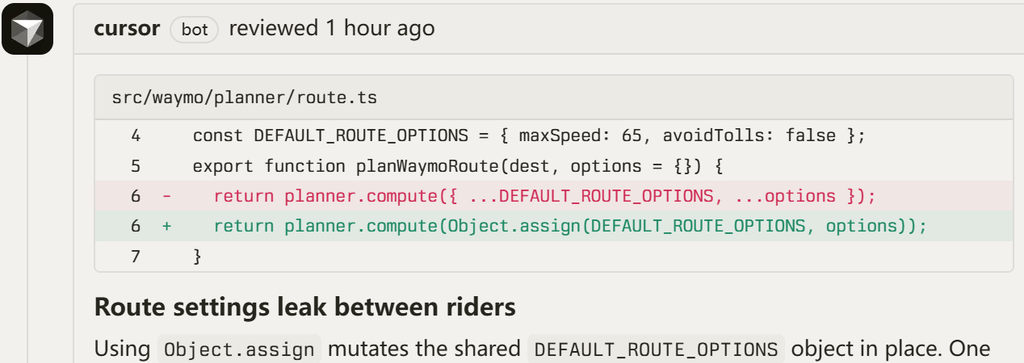
When it identifies a code vulnerability, it automatically spins up an isolated virtual machine (VM) in the cloud. It then drafts the fix and pushes it directly as a commit to your PR branch.
In our tests, it successfully handled routine issues like undefined variables and spelling/formatting errors. Because of this, we were able to directly merge about 34% of these auto-remediation commits with a single click.
In daily development, if you rely on Claude Code as your primary authoring assistant, configuring Cursor Bugbot as a PR cross-reviewer is an excellent strategy. Developers and their assistants using the same underlying model often share similar coding biases and blind spots.
Therefore, having Bugbot act as a “second pair of eyes” is highly effective. It successfully catches signature machine-generated patterns from Claude, such as stiffly prefixing comments with “Note:” or repeating robotic phrases like “This ensures that…” in docstrings.
In contrast, CodeRabbit is noticeably slower, typically taking several minutes to render results on GitHub. Although it automatically generates a clear, concise PR summary when you submit, you are left waiting in the browser interface for its multi-layered static analysis to complete, lacking the highly responsive, real-time feedback loop that Bugbot provides locally or within the PR itself.
2. High-Risk Vulnerability Interception Rate
If your primary goal is to intercept high-severity business vulnerabilities that could crash your systems, CodeRabbit is the superior choice. CodeRabbit’s true competitive advantage lies in its hybrid architecture.
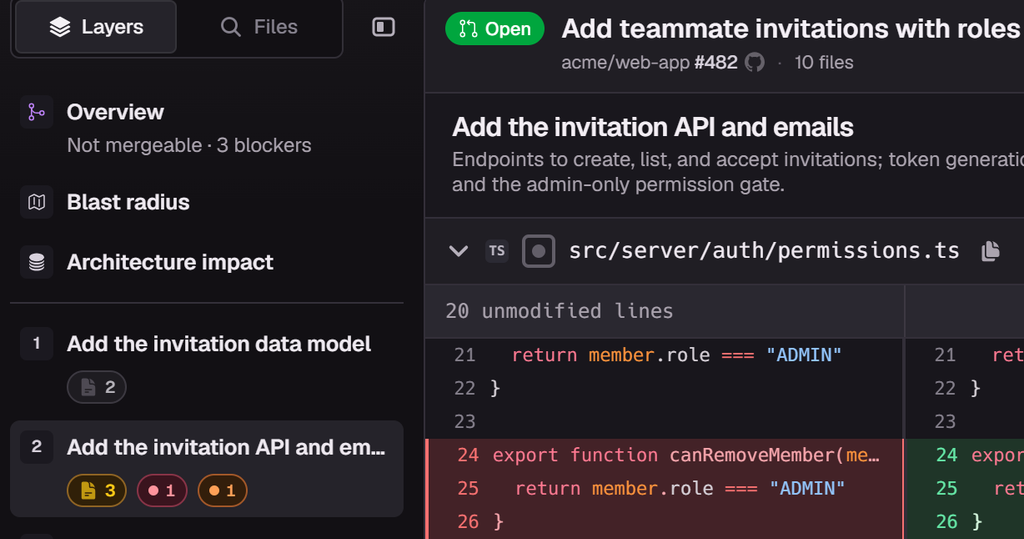
It overlays more than 40 static analysis linters and SAST (Static Application Security Testing) scanners on top of large language models. This combination heavily suppresses the LLM hallucinations that occur during purely text-based probabilistic reasoning.
In our 32-PR stress test, it intercepted high-risk vulnerabilities in 3% of the cases. These included a severe Zip Slip path traversal vulnerability and two Insecure Direct Object Reference (IDOR) vulnerabilities that could have led to horizontal privilege escalation.
In this dimension, Cursor Bugbot feels somewhat lightweight. While official data indicates Bugbot catches an average of 0.62 bugs per review, its analysis relies entirely on probabilistic LLM reasoning.
It completely lacks a deterministic static security scanning mechanism. Consequently, its capability to intercept complex cross-file authorization issues or deep business logic flaws is quite poor. In fact, it occasionally raises repetitive false positives on older commits that have already been fixed.
Real-World Limitations of Both Tools
| Real-World Pain Points | CodeRabbit Drawbacks & Traps | Cursor Bugbot Drawbacks & Traps |
|---|---|---|
| Billing & Consumption Model | “Fair Use Policy” is highly opaque, with zero real-time alerts when throttling is triggered. | Progressive “incremental” reviews; multiple pushes can quickly lead to unexpected billing surprises. |
| Cancellation & Support Barriers | Subscription cancellation is extremely user-unfriendly; the UI hides the cancel button, and charges can continue even after a credit card is removed. | The core Autofix feature is forced to disable under Legacy Privacy Mode. |
| False Positives & Noise Control | Repetitive nitpicking and arguing over unrelated tech stacks or naming conventions that have already passed CI. | Fails to accurately identify complex business authorization logic, letting deep high-risk vulnerabilities pass through. |
CodeRabbit’s Subscription Cancellation Disputes and Support Foot-Dragging
Looking at real feedback from the developer community, several indie developers and startup teams have complained about CodeRabbit’s cancellation traps. Many users vent that when they want to cancel their subscriptions, they cannot find a one-click “Cancel” button anywhere in their Organization dashboard.
When they email customer support, agents often drag out the process for days. They frequently use excuses like “you logged into the wrong Organization” to delay the cancellation. In 2026, maliciously hiding the cancellation option like this is a highly frustrating anti-pattern in the SaaS industry.
Cursor Bugbot’s Incremental Reviews and Spiraling Costs
In my own experience with Bugbot, the most frustrating flaw is its severe “incremental review” issue. If a PR contains four unrelated bugs, it might only point out two of them in the first review.
Once you fix them and push again, it grudgingly points out the remaining two in the second round, much like squeezing toothpaste out of a tube. Since Bugbot shifted to a usage-based billing model, every single push and review cycle directly consumes your limited review quota.
Frequently invoking Cloud Agents for code auto-healing triggers per-use charges. This can quickly rack up unexpected variable bills of up to $300 in a short period.
Additionally, if your company enables Legacy Privacy Mode for compliance reasons, security restrictions will lock out the cloud VM’s write permissions. This completely disables its core Autofix feature.
Frequently Asked Questions (FAQ)

1. Which tool is better suited for startup teams in 2026?
The larger the team, the more cost-effective CodeRabbit Pro becomes because it keeps your budget completely predictable. CodeRabbit Pro uses a flat seat-based pricing model of $24 per user/month, meaning frequent PR submissions won’t trigger unexpected surcharges.
On the other hand, Cursor Bugbot’s team plan not only has a higher base price, but its usage limits are much stricter. Once your team depletes its monthly pool of 200 PRs, invoking Cloud Agents for code repairs will trigger incredibly expensive, usage-based overage charges.
2. Can Cursor Bugbot completely replace CodeRabbit’s security auditing capabilities?
Absolutely not. Although both tools are positioned in the AI code review space, their underlying design philosophies are fundamentally different.
CodeRabbit relies on over 40 built-in linters and SAST security scanners to establish a safety net. This effectively filters out hallucinations in the LLM’s suggestions.
Bugbot, conversely, operates on an opaque architecture driven purely by probabilistic LLM predictions. For enterprise scenarios that require compliance audits and rigorous vulnerability prevention, Bugbot cannot replace CodeRabbit.
3. What are the potential risks of having AI review AI-written code?
This creates a highly dangerous “recursive blind spot.” If your code is generated by Claude Code and you use Bugbot to perform the PR review, they share highly overlapping training data distributions.
Bugbot is also powered by Claude models, meaning they share similar model preferences. This makes it incredibly difficult for the AI reviewer to spot edge-case logic flaws in code that looks perfectly formatted.
The two AIs can end up confirming each other’s assumptions in a hall of mirrors. This ultimately leaves subtle logical bugs to slip through and blow up in production.
Bugbot vs CodeRabbit Selection Guide
Your choice should ultimately depend on your team’s specific workflow and size:
Choose CodeRabbit if:
Your team has more than 5 members, and you have clear code security and compliance auditing requirements.
Your workflow revolves entirely around the GitHub/GitLab web interface and PR merge pages, and you cannot tolerate unpredictable, variable billing.
Choose Cursor Bugbot if:
You are an indie developer or a highly agile, developer-centric team fully built around the Cursor IDE.
You want a self-healing branch experience where typing /review locally yields an isolated cloud VM fix and auto-pushed commits within 90 seconds.
Choose NEITHER if:
Your company operates in finance, defense, or highly sensitive, classified sectors where data compliance and cybersecurity mandates strictly prohibit any source code fragments (including PR diffs) from leaving your local intranet to be analyzed on an external public cloud.
In that case, your best path is to deploy a completely free, 100% physically isolated setup of Semgrep OSS, SonarQube, or Bandit within your private CI/CD pipeline.