Gladia vs Wispr Flow: Real-World Testing and True Costs in 2026
Here is the bottom line up front. If you want a zero-setup desktop dictation tool that drops clean, formatted text right into any input box across Mac or Windows, go with Wispr Flow. But if you are building automated pipelines or voice agents, or processing meeting recordings without paying a monthly wrapper tax, Gladia’s raw API is the smarter play.
A lot of people searching for gladia vs wispr flow think these two are direct competitors fighting for the same spot in their dock.
They really aren’t.
Over the past few months, I put both through serious daily use. On one end, I dictated over a hundred thousand words of drafts and coding prompts through Wispr Flow. On the other, I piped our team’s customer support calls and multilingual meetings directly into Gladia’s Solaria engine.
Both tools hit real sweet spots in 2026. Both also hide a few sharp edges behind their landing pages that can easily make you regret signing up.
Quick Specs Comparison
| Feature | Wispr Flow (Desktop App) | Gladia (Speech-to-Text API) |
|---|---|---|
| Primary Focus | System-wide dictation companion for fast, cursor-focused typing | Developer-first transcription API for long-form audio and multilingual data |
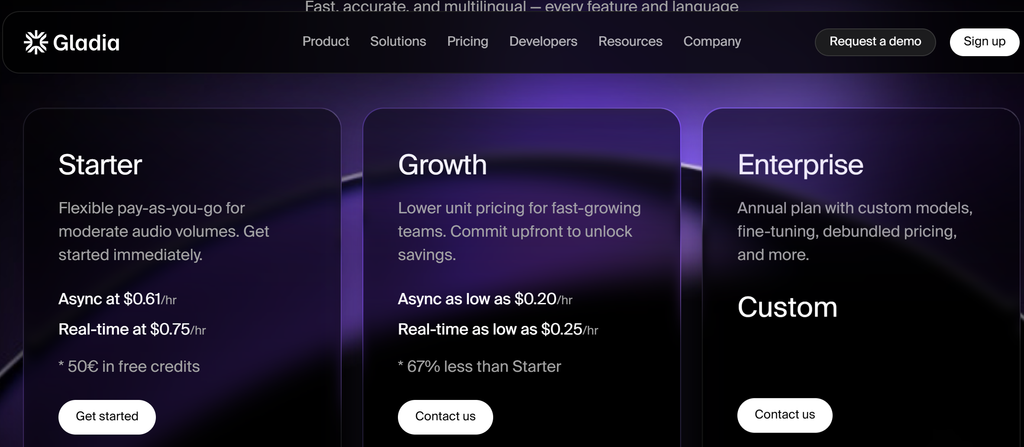
| Pricing | Pro plan at $15/month ($12/month billed annually) | Async batch transcription at $0.61/hour, live streaming at $0.75/hour, scaling down to $0.20/hour for high volume |
| Free Tier | 2,000 words per week, strictly capped | €50 free trial credits upon signup with no expiration date |
| Key Capability | Automatically strips filler words and adjusts tone based on your active window | 8.26% benchmark WER, integrated speaker diarization, and native code-switching |
| Learning Curve | Zero code; install the app, press a hotkey, and speak | Requires writing code or piping requests through automation tools |
Daily Workflow: Fluid Dictation vs. Raw Data Pipelines
Wispr Flow exists to cure typing fatigue. Whether I am firing off Slack replies, drafting emails, or prompting Cursor, I double-tap the Fn key, speak naturally, release, and watch cleaned-up text drop right into place.
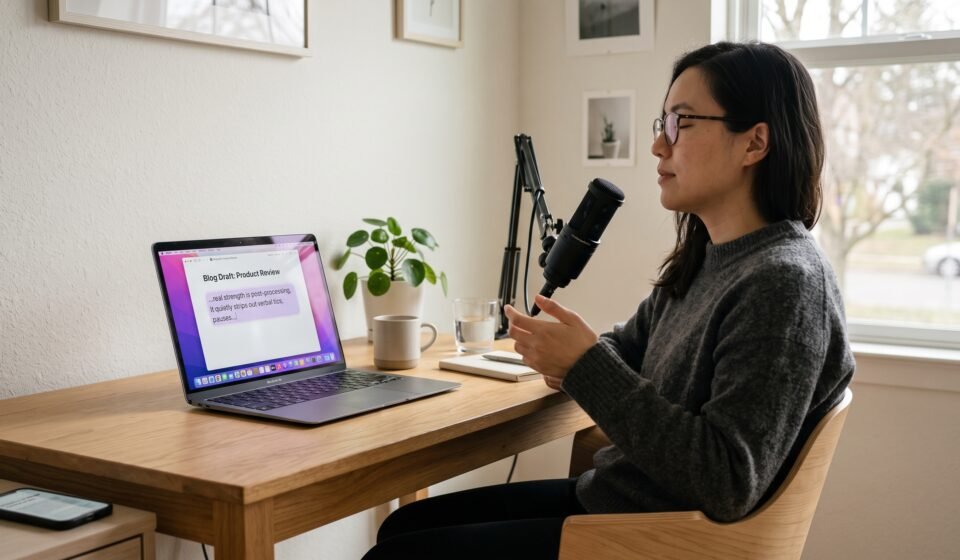
Its real strength is post-processing. It quietly strips out verbal tics, pauses, and rambling filler, reshaping messy thoughts into coherent sentences on the fly. In my daily tests, it pushed my effective drafting speed from an average of 90 WPM up to around 184 WPM.
The catch is that this convenience ends right at the active cursor.
Try feeding Wispr Flow a 40-minute customer interview with multiple speakers, and you will hit a wall. You get a single wall of text with no speaker tags and zero exportable timestamps.
Gladia is an entirely different beast. You do not get a typing window or a menubar widget. You upload audio files through a POST endpoint or stream raw audio over WebSockets.
In return, Gladia hands back structured data: word-level timestamps, speaker diarization tags, and clean semantic chunks. A quick script lets me dump transcribed meetings straight into my private notes database without ever sitting at my desk pressing hotkeys.
Accuracy, Background Noise, and Code-Switching
In a quiet home office, Wispr Flow delivers sharp results on English speech. The underlying language model quietly fixes minor grammatical slips, producing smooth, readable prose.
Step outside that quiet bubble, though, and things get shaky. When background chatter from a coffee shop kicks in, or when I pick up my talking speed, Wispr Flow tends to drop words or swap technical jargon for phonetic approximations.
Gladia’s Solaria engine handles messy audio with much better composure. In independent benchmark tests, its Word Error Rate (WER) hovers around 8.26%, holding up particularly well on conversational audio where typical transcription models struggle.
Multilingual speech reveals an even bigger gap. When I bounce between English technical terms and conversational Chinese in the same sentence, Wispr Flow occasionally scrambles capitalizations or adds awkward punctuation.
Gladia handles code-switching natively. Switching languages mid-breath causes far fewer hallucinations and preserves technical terms much more reliably.
Pricing Models and What You Actually Pay
Wispr Flow’s free tier is tight. At 2,000 words per week, an average speaker runs through that in about 15 minutes. Heavy writers will easily exhaust the cap by Tuesday afternoon, making the $15/month Pro tier practically mandatory.
Fifteen dollars a month is reasonable if you use it all day. But like any fixed subscription, you keep paying that fee even when you travel or barely touch your computer for two weeks.
Gladia charges strictly for the audio minutes processed.
On its starter tier, processing an hour of asynchronous audio costs roughly $0.61. That rate includes speaker diarization and text formatting out of the box, with no hidden add-ons.
If I process 30 minutes of voice notes every single day, my monthly Gladia bill rarely cracks $10. For engineering teams running audio at scale, volume tiers push that down toward $0.20 per hour, making fixed per-seat subscriptions look expensive by comparison.
Limitations and Unspoken Trade-offs
Using Wispr Flow daily comes with a privacy compromise you need to weigh carefully.
To adapt formatting and tone to your workflow, Wispr Flow takes periodic background screen captures of your active window to pull visual context. For anyone handling customer agreements, proprietary code, or confidential files, that background capture is a valid reason to pause, which explains why several user reviews highlight data governance concerns.
Its mobile experience is another weak link. Without a native system-wide keyboard extension on iOS, you have to open a standalone app to record, wait for transcription, and copy-paste the text back to your original app.
Windows stability also lags behind the macOS build, showing occasional hotkey latency across multi-monitor setups.
Gladia’s limitations are purely technical.
There is no front-end interface. Even with €50 in free trial credits sitting in your account, an API key and terminal documentation will not help you type an email faster if you cannot write the code to glue it together.
Additionally, Gladia’s speaker diarization runs primarily on offline batch jobs. If you need to separate multiple speakers live during a streaming call, its current real-time endpoints require you to engineer custom audio chunking on the client side.
Which One Should You Actually Buy?
Pick Wispr Flow if your primary goal is typing less. If you spend your day writing docs, clearing inboxes, and prompting LLMs on a Mac, $15 a month is worth every penny for the zero-friction experience, provided your work does not bump against corporate privacy policies.
Pick Gladia if you are wiring transcription into product features, automating call analysis, or simply tired of paying a steep monthly markup for audio you only process occasionally. The API is clean, handling noisy speech and code-switching is notably more reliable, and you only pay for the exact audio you use.
If you handle regulated records, strictly confidential IP, or operate under zero-cloud data policies, skip both. In that case, running a local, open-source Whisper deployment remains the only safe way to keep your voice data entirely on your own machine.